How to Build an App Like DoorDash in 2026 (Without a Clone Script)
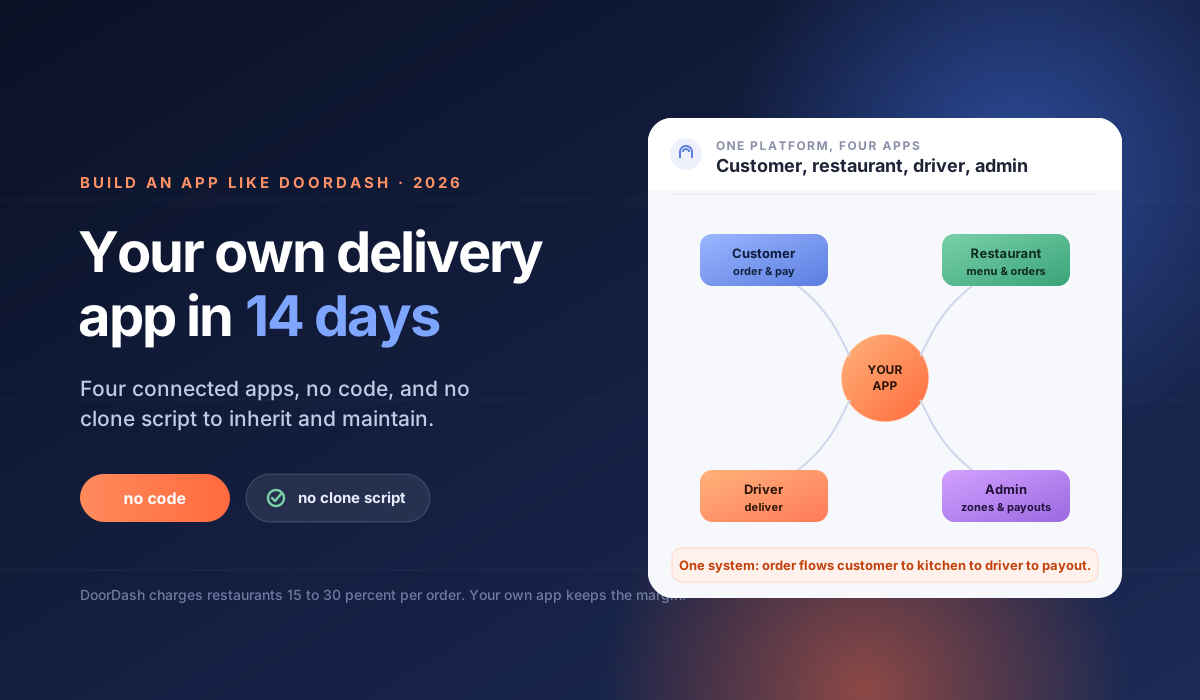
You build an app like DoorDash by launching four connected apps, a customer app to order, a restaurant app to manage the menu and orders, a driver app for delivery, and an admin console to run it, and you have three ways to do it: custom development, a clone script, or a no-code platform. This guide walks through each route, why clone scripts usually backfire, what it costs, and how a no-code build goes live in about 14 days.
How do you build an app like DoorDash?
You build an app like DoorDash by assembling a four-sided system: customers order, restaurants accept and prepare, drivers deliver, and you manage it all from an admin console. You can code this from scratch, buy a clone script, or configure a no-code platform that ships the whole stack ready. The right route depends on your budget, your timeline, and whether you want to maintain the software yourself.
What are you actually building?
DoorDash looks like one app, but it is four working together. There is the customer app to browse restaurants, order, pay, and follow the order. There is the restaurant app or panel to accept orders and manage the menu. There is the driver app to pick up and deliver. And there is the admin console where you manage restaurants, delivery zones, payouts, and reporting. Any app like DoorDash needs all four, sharing one system so an order flows from customer to kitchen to driver to payout without manual re-entry. This guide is about launching your own branded app; if instead you want to aggregate many independent restaurants under one platform, that is a food delivery marketplace, and how to build a food delivery marketplace covers that model. DoorDash is built around one restaurant's menu. If you want to sell a whole store's shelf instead, that is grocery, and how to build an app like Instacart covers the catalog and shopper side.
The three ways to build a DoorDash-style app
There is no single "build an app like DoorDash" button. There are three routes, and they differ sharply in cost, speed, and who maintains the result. Score them against your budget and timeline before you pick.
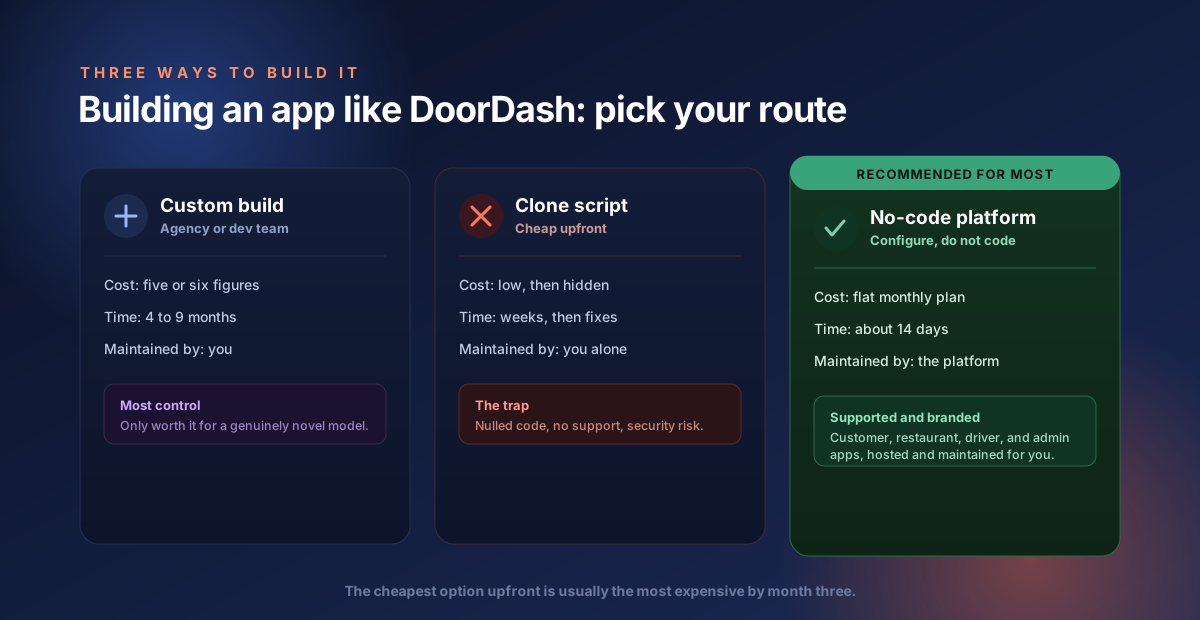
| Route | Typical cost | Time to launch | Who maintains it | Best for |
|---|---|---|---|---|
| Custom development | Five or six figures | 4 to 9 months | You and your dev team | A genuinely novel model with capital to fund it |
| Clone script | Low upfront, high hidden cost | Weeks, then ongoing fixes | You (and whoever you can find) | Almost no one, once you count the real cost |
| No-code platform | Flat monthly subscription | About 2 weeks | The platform (managed) | Most operators launching a standard delivery app |
For the full numbers, see what a food delivery app costs and the cost to build a marketplace.
Why a "DoorDash clone script" is usually a trap
Search for a DoorDash clone and you will find dozens of cheap or free clone scripts. They look like a shortcut, but most turn into a liability. A clone script is code you now own and have to run, patch, and keep alive yourself, often with no real support and no accountability if it breaks. Many are nulled or pirated builds with security holes. The low upfront price hides the real cost: the developer hours to fix it, lock it down, and keep it running. If you would not run your business on unsupported software, do not run it on a clone script.
The honest alternative: a no-code platform
A no-code platform gives you the speed a clone script promises without the risk. Instead of owning raw code, you configure a ready, maintained platform: set up your restaurants, menus, delivery zones, and payments, brand the apps, and go live. The platform handles hosting, security, and updates. You get the same four-app DoorDash-style stack, but supported and maintained, and you launch in weeks rather than inheriting someone else's code.
What features does an app like DoorDash need?
An app like DoorDash needs the core loop that gets an order from a customer to their door. That means menu and restaurant management, cart and checkout with card payment, order acceptance for restaurants, delivery assignment and a driver app, order status updates for customers, and an admin console for zones, payouts, and reporting. Start with this core and add extras later. Trying to match every DoorDash feature on day one is how launches stall.
How much does it cost to build an app like DoorDash?
Building an app like DoorDash from scratch runs into five or six figures with an agency and takes months. A clone script looks cheaper upfront but adds ongoing maintenance and security costs that are hard to predict. A no-code platform replaces both with a flat monthly subscription. On Nipige, restaurant and food plans start from $899 a month with $0 platform transaction fees, so unlike DoorDash itself, you do not lose 15 to 30 percent of every order to commission. At $50,000 a month in orders, a 20 percent commission would cost $10,000, far more than a fixed plan. See how DoorDash makes money for why those commissions matter.
How long does it take to launch?
With a no-code platform, a branded app like DoorDash can go live in about 14 days, because you configure a ready template instead of building from scratch. Custom development takes months of design, build, and testing. A clone script can be installed quickly but then needs weeks of fixes before it is stable. The two-week no-code timeline covers restaurant setup, menus, delivery zones, payment connection, branding, and driver onboarding.
Can the app be fully branded to my business?
Yes. A white-label platform puts your brand, logo, and domain across every app, so customers see your delivery service and never the platform behind it. The stronger platforms also publish native iOS and Android apps under your own name. This matters because the customer relationship and the brand should be yours, which is exactly what you lose when you list on DoorDash instead of running your own app.
How to build your app like DoorDash, step by step
On a no-code platform the build is a configuration process, not a coding project. You work through five steps and the platform produces the apps. Here is the order that gets you live fastest.
- Set up your restaurants and menus. Add each restaurant, its items, prices, and opening hours.
- Define your delivery zones. Decide where you deliver and set any fees or minimums per zone.
- Connect payments. Link Stripe or PayPal so customers can pay by card and restaurants and drivers get paid out.
- Brand the apps. Add your logo, colors, and domain across the customer, restaurant, driver, and admin apps.
- Onboard drivers and go live. Invite your drivers, test one order end to end, then open to customers.
Because the apps are prebuilt, this takes about 14 days, not the months a custom build needs.
What are the most common mistakes when building an app like DoorDash?
The most common mistakes are copying every DoorDash feature at launch, buying a cheap clone script to save money, and opening a whole city before you have enough restaurants. Each one either stalls the launch or drains the budget. Start narrow, launch on supported software, and add features once real orders are flowing.
Four that sink early food delivery apps:
- Feature overload at launch. DoorDash has years of features. Copying all of them before your first order buries you in build time. Ship the core ordering loop, then add.
- The clone-script shortcut. A cheap or nulled script saves money on day one and takes it back in security fixes, downtime, and developer hours for months. It is the most expensive cheap option in this category.
- Going wide too early. Ten restaurants in one neighborhood beat fifty spread across a city, because customers need enough choice nearby to order again. Concentrate supply, then expand zone by zone.
- Ignoring the economics. If you build your own app to escape DoorDash commissions, then pick a platform that also takes a cut of every order, you have solved nothing. Check the fee model before you commit.
Where Nipige fits
Nipige is a no-code, white-label platform for building an app like DoorDash without a clone script or a six-figure build. You configure a ready restaurant and food template, add your restaurants, menus, and delivery zones, connect Stripe or PayPal, and go live with customer, restaurant, driver, and admin apps in about 14 days. There are $0 platform transaction fees, so every order's margin stays with you rather than going to an aggregator, and the apps are fully branded to your business. See pricing for current plans.
FAQ
How do you build an app like DoorDash? You build the four connected apps DoorDash uses: a customer app to order, a restaurant app to manage menus and orders, a driver app for delivery, and an admin console. You can build it custom, buy a clone script, or configure a no-code platform. A no-code build ships the whole stack ready and launches in about 14 days.
Is a DoorDash clone script a good idea? Usually not. A clone script is code you must host, secure, and maintain yourself, often with no support or updates, and many are nulled builds with security risks. The low upfront price hides the real cost of keeping it running. A maintained no-code platform gives you the same result without inheriting someone else's code.
How much does it cost to build an app like DoorDash? A custom build runs into five or six figures. A clone script looks cheap but adds unpredictable maintenance and security costs. A no-code platform replaces both with a flat monthly subscription. On Nipige, restaurant and food plans start from $899 a month with $0 platform transaction fees.
How long does it take to build a food delivery app like DoorDash? With a no-code platform, a branded app can go live in about 14 days because you configure a ready template. Custom development takes months, and a clone script needs weeks of fixes before it is stable.
What apps do I need for a DoorDash-style delivery service? Four: a customer app to order and pay, a restaurant app to accept and prepare orders, a driver app to deliver, and an admin console for restaurants, delivery zones, payouts, and reporting. They should share one system so orders flow through without manual handoffs.
Do I pay commission like DoorDash charges restaurants? It depends on how you build it. DoorDash charges restaurants roughly 15 to 30 percent per order. If you run your own app on a flat monthly plan with $0 platform transaction fees, you keep that margin and pay only your payment processor's standard rate.
Can I build an app like DoorDash without coding? Yes. A no-code platform lets you configure menus, delivery zones, payments, and branding without writing code, and produces the customer, restaurant, driver, and admin apps for you. You launch in about two weeks instead of the months a custom build takes.
The Nipige team builds and operates production marketplace infrastructure - vendor onboarding, real-time dispatch, payments, and native apps - drawing on 13+ years of enterprise billing and monetization engineering at Trigital Technologies.